Skip to content

Gmail Logins – GmailLogins.com

Gmail Login Helps

Menu

Primary menu

  • Home
  • About Us
  • Privacy Policy
  • Terms of Use
  • Contact Us

Category Archives: Create Gmail Account

How to create a Gmail account for FREE?

Posted on June 12, 2016 by Bnyk — No Comments ↓

Create a Gmail account for free which is a web based email account, in which emails are stored on internet rather than your PC. It can be a wide and flexible option as you can access emails from any computer that has internet access.

You’ll need a Gmail ID to be able to login to Gmail. In this article, we will describe the procedure to create a Gmail account.

Steps to create a Gmail account:

  1. Open any web browser available on your computer and go to gmail.com or mail.google.com or open Google home page www.google.com

    create a gmail account
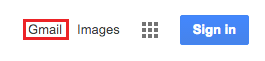
  2. Click on Gmail at the top right corner of the page.
    create a Gmail account
  3. Now you will be in the “Sign in” section. As you don’t have any Gmail account click on “Create an account”.

    create a Gmail account
  4. Now in the process to create a gmail account, you will see a new page where Google asks for some information about you. At first, you have to enter your First and Last Name. Then choose your username which needs to be unique and that will be placed before ”@gmail.com”. Google may have to check the username to make sure that on one already has it. Type a username on the respective box and fill out the rest of your information. Continue filling up the forms new password; Birthday; Gender; Mobile number; current email address if you have any; type-in the number that your in the image and lastly location.
    Make sure that you have checked on the box saying that you agree the Google terms of service and privacy policy and click to the “Next step” button.
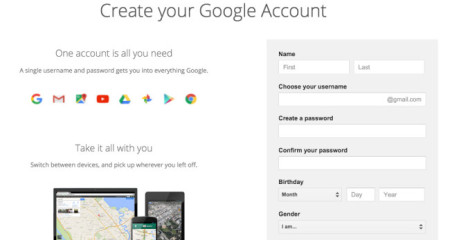
    create a Gmail accountIf the username you requested is already being used by someone else, then you will get respective message offering you some alternatives. Now, you can either accept one of the alternatives or type another username and check its availability again. And again fill up the other boxes. You have to do this a few times until you finalize your valid email address.You will need to enter a password with at least 8 characters long so that you can log on to your account securely. It’s better to use password combining the numbers and letters so that is difficult to guess. You need to re-enter your password to confirm it. It will also ask you to enter some random words on the bottom, to ensure that you are not a robot.
  5. Next step you can skip it and also go it later its about making your Google Plus setup.
  6. Congratulation! you have successfully manage to create a gmail account.
Posted in Create Gmail Account, Gmail Sign Up | Tagged create a Gmail Account, create a new account, Create Account Gmail, create gmail new account | Leave a reply

Gmail Sign in for Email

Posted on June 11, 2016 by Bnyk — No Comments ↓

How to do Gmail sign in for email? Looking for easy steps to do Gmail Sign in for email? Well you are on a right page. In this page we have explained each and every steps with images on how you can perform Gmail sign in for email. Just make sure you do not miss out on any steps explained below.

How to perform Gmail Sign in for Email?

  1. First of all you’ll need to see this guidance page and at the same time you’ll have to try Gmail sign in for email procedure in another page for that you’ll have to open a new window. For, new-window you can use the same web-browser by clicking on File and New window or you can also use keyboard shortcut key like CTRL+N for Window based OS users and COMMAND+N for MAC OS users.
  2. After opening a new window you’ll have adjust this window and new window side by side.
  3. Now on the address bar you’ll have to type in any of the links mentioned below:
    1. mail.google.com
    2. Gmail.com
    3. accounts.googlel.com

      gmail sign in for email
  4. Just after the page loads look for word ‘Create an account’ in this page and click on it. Check the image below to see where as a reference.gmail sign in for email
  5. Now to get Gmail Sign in for Email you’ll have fill up the form by Google on the next page that just got loaded up.
  6. Form for Gmail Sign in for EMAIL:
    1. Your First name & Last name
    2. Choose username – this will be your Gmail sign in for Email address. When choosing make sure its unique or you can also use the one that Google suggests.
    3. Create a new password for this account and re-type the same password again on the next row.
    4. Next you’ll have to add your Birthday and Gender.
    5. Enter your mobile number – before doing so – first choose your country code.
    6. If you have any other email address with Gmail or Hotmail or even Yahoo you may enter it on the next row where it says ‘Your current email address’
    7. Now you’ll have prove that you are not a robot – to do that you’ll have enter the number that you would see in the image shown in the image or you can just skip it by clicking on the correction box but skipping this step you’ll have to verify yourself from SMS or phone.
    8. Next is that you provide from which country you are from.
    9. Now click on the correction box where it says ‘I agree…. ‘
  7. Now, click on ‘Next step’ to continue your Gmail sign in for email.
    Gmail sign in for email
  8. The page that loads up next will ask you id you would like to join Google+ profile. (Google+ is same like Facebook but different)
    1. You can skip this step by clicking on SKIP, else
    2. Make Google+ and continue.
  9. DONE! You have performed Gmail Sign in for email. Now go to your Gmail mailbox and enjoy 🙂How to do Gmail Sign In?
Posted in Create Gmail Account, Gmail Sign Up | Tagged For email gmail, Gmail Email sign in, gmail sign in email, gmail sign in for email, gmail sign up | Leave a reply

Open Gmail Account – How to do in just 9 Steps.

Posted on March 20, 2016 by Bnyk — No Comments ↓

Email accounts have become an important part for everyone’s life for sending and receiving emails from associates electronically using the World Wide Web (www). Google is a powerful search engine that also provides mailing service known as Gmail. You will need to open Gmail account in order to own a personal mailing database.

Open Gmail account is an easy procedure you need to perform. It is also important for making it unique and secure. Given below are the ways to open Gmail account.

How to open Gmail account:

Step1: Open an internet browser or simply open a new tab (Ctrl + T) in the browser you’re using right now.

Step 2: Open Gmail login page using websites www.gmail.com or mail.google.com.

open gmail account

Step 3: You will be directed to Gmail login page. Click on ‘Create account’ to open Gmail account of your own.

Step 4: Enter all the information that you’re asked to enter.
Open Gmail Account

  • Enter a valid username. If the username you’ve entered already exists, Google will suggest you new ones. You can either select one of them or pick a different username.
  • Select your ‘Gender’ (Male, Female, or Other).
  • Enter your mobile number. Select your respective country from the extension box by clicking on the flag.

Step 5: Enter password to protect your Gmail account.

  • You can use uppercase letters, numbers and symbols to strengthen your password.
  • Also make sure that your password is 6 to 12 characters long to ensure better security.

Step 6: Enter an alternative email address if you have any.

Step 7: Type in the word given in the picture as a verification in in box mentioned ‘Type the text:’.

  • If you are unable to read the given text, you can listen to it by clicking on speaker symbol.
  • You can also get another text by clicking on rotate symbol.
  • Click on question mark symbol to know better about this system.

Step 8: Select your country by clicking on ‘Location’. Select from the extension box.

Step 9: Put a check on ‘I agree to the Google Terms of Service and Privacy policy’ and click on ‘Next Step’. You have successfully performed open Gmail account. Now own your very own Gmail account. Follow the above steps in the future to open Gmail account whenever necessary.

Posted in Create Gmail Account, Gmail Sign On, Gmail Sign Up | Tagged create a new account, create a new gmail account, create email account, create gmail, gmail account, Open Gmail Account | Leave a reply

Post navigation

← Older posts
Newer posts →

Primary Sidebar Widget Area

Join us in Facebook

Mail Logins

Recent Posts

  • How to Add a Second Gmail Account (Computer, iPhone and Android)
  • Gmail Verification Code Not Working? 7 Easy Fixes
  • Couldn’t Find Your Google Account? 7 Fixes for the Gmail Error
  • Gmail Password Reset: How to Recover Your Account in 7 Steps
  • Gmail Login Not Working on Android? 7 Easy Fixes

Check This OUT:

Categories

Copyright © 2026 Gmail Logins – GmailLogins.com. All Rights Reserved. Privacy Policy
Theme: Catch Box by Catch Themes
Scroll Up