Skip to content

Gmail Logins – GmailLogins.com

Gmail Login Helps

Menu

Primary menu

  • Home
  • About Us
  • Privacy Policy
  • Terms of Use
  • Contact Us

Gmail Sign Up New Account – Simple Steps

Posted on February 24, 2016 by Bnyk — No Comments ↓

Gmail Sign Up New Account –  Know More! If you are thinking of creating a new email account, Gmail might be the first that popped in your head. Well, why not? Gmail has become one of the most popular web-based email portal with its ever increasing features and service. Did you know one Gmail account allows you to access all of the Google services like Google Drive, Google Plus, YouTube, Google Maps, Google Analytics and many more (except the premium ones).

So here you are, at the right page to help you for Gmail Sign up new account step-by-step with illustrations. If you are stuck at any step, please feel free to write to us in the comment box.

Gmail Sign up new account in steps:

  1. Okay, the first step obviously is to open your web browser or you can just open a new tab in this browser you are using. For you convenience, we would suggest you to open this page in a new window side by side so that you can follow the steps easily.
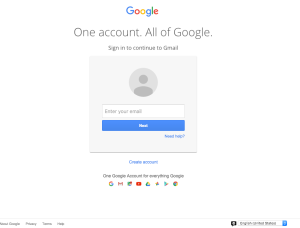
  2. In the address bar of the browser, enter Gmail.com which will take you to the Gmail sign in page.

    gmail sign up new account
  3. When this page loads, click on the “Create account” link at the bottom as shown in the image. However, if someone else in already signed in to Gmail from that browser, you’ll need to sign out first and follow the same steps.If you need help, please go through our guide for Gmail Sign out.
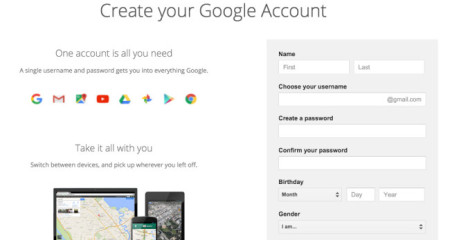
  4. Now since “Create Google Account” page loads, you’ll have to fill up the form with simple questions for Gmail sign up new account.
    gmail sign up new account
  5. First step is your typing your name.
  6. Then, enter your username, one which you’d like to use as your Gmail email.
    • Choose a unique username. If the username you’ve chosen is not available, message saying so will be displayed.
    • In that case, you’ll be suggested with similar usernames that are available. You can either use one of those or change your username by adding numbers.
  7. Next, create a password easy to remember and something that would not be easy to guess. Make sure your password is strong enough for your account’s security.
  8. Select your Birthday and Gender.
  9. Then, comes a very important step, entering your mobile phone number followed by Country Code which will be useful in case you lose your Gmail login credentials or to verify your account.
  10. You don’t need to enter your Current email address if you have typed in your mobile phone number.
  11. Now we are almost there to complete creating a new Gmail account. Enter the text shown in the box. If you don’t get the text, you can ask for a new one or get an audio version just by clicking the respective buttons besides the box.
  12. Tick the box to show that you agree to the Google terms and conditions for Gmail Sign up new account.
  13. So finally, just click the “Next step” button and Congratulations, you’ve created a new Gmail account. Happy to help. Cheers 🙂
  14. Well, you just managed gmail sign up new account.

If you need help to login to your Gmail account, you can check our tutorial to login to Gmail.

Or if you need to change your Gmail password and don’t know how, we are here to help you step-by-step, go through Change Gmail Password.
Posted in Create Gmail Account, Gmail Sign Up | Tagged create new gmail account, gmail new account, gmail sign up, gmail sign up new account | Leave a reply

Change Gmail Password – Right Now!

Posted on February 23, 2016 by Bnyk — No Comments ↓

Your gmail account is an important part of your social, and work life. Each account is secured via password which is known only by the user. But, over time you have to ensure security of your gmail account. That’s where change gmail password comes in. Changing passwords are necessary to be changed in every account once in a while to ensure stronger and better security. Changing your account password once in every month is recommended for security purpose, but try not to forget the password as one can mess up the passwords when frequently changed.

Change gmail password is very easy to perform to secure your gmail account. You are supposed to follow through a few steps to change your gmail password and securing your account. Account data piracy is prone in the modern world if your account is not secure. A hacker may steal your information if your account is not properly secure and use it to gain advantage through your data. So, better stay safe than being vulnerable.

Step-by-Step Process to Change Gmail Password:

  1. Open gmail.com from your web browser.
  2. If you are not directly directed to Gmail login page, click on the Sign in button on the top-right corner of the page. Else, skip this step.
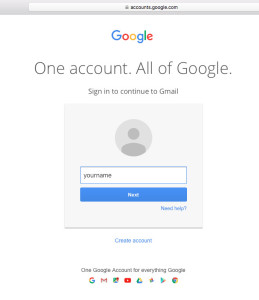
  3. In the Gmail login page, enter your Gmail email ID, click Next.change gmail password
  4. Then, enter your Gmail password in the provided field and click on Sign In button.change gmail password
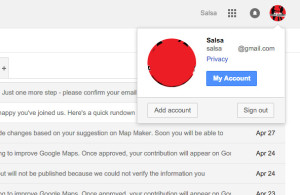
  5. Once you’ve logged in to your account, click on your profile picture at the top right corner of the page and go to My Account.change gmail password
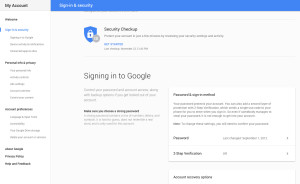
  6. Click on Signing in to Google in Sign-in & security.change gmail password
  7. At the right side of the page, click on Password.
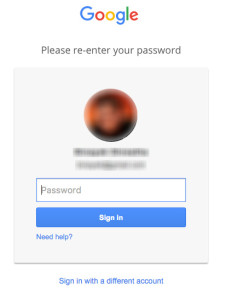
  8. Re-enter your gmail password and press enter.change gmail password
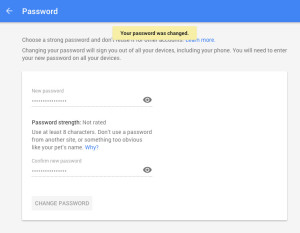
  9. Type in your new password and re-type your new passwword and click on Change password.change gmail password
  10. You have performed change gmail password.

While typing in your new password, make sure you use characters such as, ‘!@#.$’, or whole numbers (1,2,3,…,9,0) to strengthen your password. Stronger your password is, more secure your gmail account becomes. Change gmail password can only be done with a computer (Windows or iOS). Mobile phones are not supported to change gmail password. You can frequently change gmail password to secure your account from being hacked. Do not share your passwords with anyone and try to perform login from your own device as far as possible.

Posted in Gmail Change Password | Tagged change gmail password, change google mail password, change password gmail, Gmail change password, Gmail Password, Gmail password change, google account password change | Leave a reply

How to do Gmail com log in to my account?

Posted on February 21, 2016 by Bnyk — 1 Comment ↓

Google has provided open access to create an account for Google to people all across the globe. Gmail com log in to my account is a small procedure you have to perform in order to log in to your gmail account.

Gmail.com is a free domain where you can send and receive emails between your friends, associates, and family. The gmail account provided to you is password protected and can be accessed by entering your username and password. In this article ‘gmail com login to my account’, you will be guided step by step in order to perform gmail com log in to my account.

To perform gmail com log in to my account, you must first have a gmail account. If you do not have a gmail account, you should make one in order to gmail.com log in to my account. gmail.com log in to my account can be performed through both PC and mobile phone (android or iOS). In this article ‘gmail com log in to my account’, you will be guided to perform gmail com log in to my account which is similar in all three operating systems.

How to perform gmail com log in to my account:

  1. Open your web browser (Google Chrome, Mozilla Firefox or Internet Explorer).
  2. Enter gmail.com in you address bar and press enter to open the gmail page.
  3. Click on Sign in at the top right corner of the page.
  4. Enter your username and Click on Next.
    gmail com log in to my account
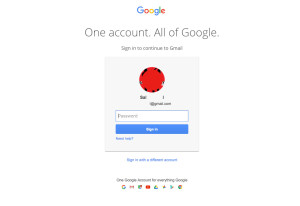
  5. Enter your password and click on Sign in.
    gmail com log in to my account
  6. Uncheck Keep me signed in if you do not want your browser to remember you.
  7. You have performed gmail com log in to my account successfully.
  8. If you happen to forget your password, click on Forgot password? and follow the steps mentioned to recover your account.

You can now easily log in to you gmail and send mail to your contacts. gmail com log in to my account also grants you access to other websites such as YouTube and Google plus. You must have a gmail account in order to perform gmail.com log in to my account. Also, ou can sign up to create a gmail account after which you will be able to perform gmail com log in to my account.

Posted in Gmail Logins | Tagged gmail account login, gmail com login, gmail login, gmail logins, gmail.com log in to my account | 1 Reply

Post navigation

← Older posts
Newer posts →

Primary Sidebar Widget Area

Join us in Facebook

Mail Logins

Recent Posts

  • Gmail Not Receiving Emails? 7 Easy Fixes
  • How to Recover a Gmail Account Without a Phone Number (7 Steps)
  • How to Set Up 2-Step Verification on Gmail (7 Easy Steps)
  • How to Sign Out of Gmail on All Devices (Step by Step)
  • How to Add a Second Gmail Account (Computer, iPhone and Android)

Check This OUT:

Categories

Copyright © 2026 Gmail Logins – GmailLogins.com. All Rights Reserved. Privacy Policy
Theme: Catch Box by Catch Themes
Scroll Up