Gmail Not Syncing? 7 Easy Fixes for Android and iPhone

When Gmail is not syncing, new emails do not appear on your phone, sent messages go missing, or the app keeps showing an old inbox. The cause is usually a switched-off setting, a weak connection or a full Google account. These seven fixes work on both Android and iPhone, so go through them in order until your inbox updates again.

1. Check Your Internet Connection

1Check your connectionWi-Fi, data, and Airplane modeQuick settingsWi-FiDataAirplaneBattery
Step 1: make sure you are online and Airplane mode is off.

Open a web page to confirm you are online. Turn Airplane Mode off and try switching between Wi-Fi and mobile data. Weak networks, such as hotel Wi-Fi, can stop Gmail from syncing. Also update the Gmail app and restart your phone for a quick reset.

2. Turn On Account Sync on Android

2Turn on account syncSettings, Accounts, Account syncAccount syncCalendarGmailContacts
Step 2: make sure Gmail is switched on in Account sync.

Open Settings, tap Passwords and accounts (or Accounts), choose your Google account, then tap Account sync. Make sure Gmail is switched on. If sync is off, new mail never reaches your phone. You can also switch it off and on again to restart syncing. Menu names vary by phone brand.

3. Allow Background Refresh on iPhone

3Allow background refreshSettings, General, then GmailBackground App RefreshMailGmailMaps
Step 3: switch on Background App Refresh for Gmail.

Open Settings, then General, then Background App Refresh, and make sure Gmail is on. If Low Power Mode is enabled, turn it off for now, since it limits background activity. Also check that notifications are allowed for Gmail in Settings.

4. Check How Many Days of Mail Sync

4Days of mail to syncInside the Gmail app settingsyou@gmail.comSync GmailDays of mail to sync7 daysDownload attachmentsWi-Fi only
Step 4: raise the number of days if older mail is missing.

In the Gmail app, open the menu, choose Settings, tap your account and look at Days of mail to sync. If it is set to a small number, older messages will not appear. Increase it, or choose to sync all mail, and make sure Sync Gmail is checked.

5. Make Sure Your Storage Is Not Full

5Check your storageA full account can stop new mailAccount storage15 GB of 15 GB usedGmailDrivePhotosFree up space
Step 5: a full account can stop mail from syncing.

A full Google account can stop new mail from arriving on your phone. Open your Google storage page and check the bar. If it is full, delete large emails or buy more storage. Our guide on Gmail storage full shows the steps.

6. Sign In Again If Asked

6Sign in againIf your account needs attentionYAccount needs attentionSign in to keep syncingSign in
Step 6: tap the banner and sign in to restart syncing.

If Gmail shows a message saying your account needs attention, tap it and sign in again. Changing your password on another device can make the old login expire on your phone. Signing in again refreshes the connection and usually starts syncing right away.

7. Check for Service Problems

Google Workspace Status Dashboard7Check for serviceproblemsAlso test Gmailin a browserService statusTodayGmailAvailableGoogle DriveAvailableGoogle DocsAvailable
Step 7: look for any Gmail incident before changing more settings.

Sometimes the issue is on Google’s side. Search for the Google Workspace Status Dashboard and check whether Gmail shows any problems. Also try opening Gmail in a browser on a computer. If mail appears there but not on your phone, the problem is with your phone’s settings.

Still Not Syncing?

Remove your account from the phone and add it again, which gives it a completely fresh connection. Our guide on Gmail not receiving emails covers other causes, and Gmail login not working helps if you cannot sign in.
Forgot Gmail Password – Here’s your Help!

You might be using multiple accounts in several webmail services and it might be difficult to remember all your passwords. If you forgot Gmail password, you can recover it easily in case if you’ve filled up additional information like your alternate email address or your phone number while signing up for your respective Gmail account. If not, it might be quite difficult to recover your password. We will guide you to reset your forgot Gmail password in case you’ve filled up your alternate email address or phone number while creating Gmail account.

Forgot Gmail Password – Help! Step-by-step

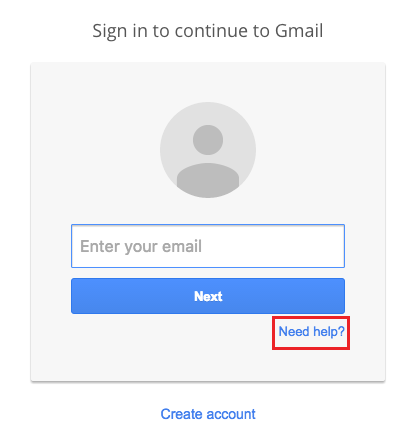
  1. Open the Gmail sign in page.
  2. Click the “Need help?” link. This takes you Google Account Recovery page.
    forgot gmail password
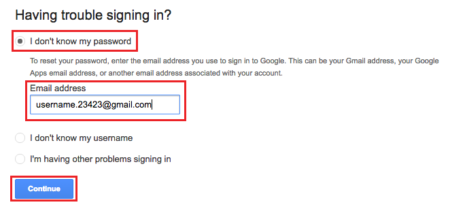
  3. Click on the “I don’t know my password”.
  4. Then, you’ll be asked to type in your Gmail ID you use to access Google services which means the account of which you’ve forgotten the password. Just type in the respective email address in the provided space.
  5. Click on the blue “Continue” button below.
    forgot gmail password
  6. In the next page, you’ll be asked to enter the last password you remember. If you don’t remember, clack “I don’t know”.
    forgot gmail password
  7. If you’ve added your phone number while signing up, Google will send notification regarding for permission to account recovery to your device to make sure it’s you trying to reset your forgot Gmail password. For this, click on the blue “Continue” button.
    forgot gmail password
  8. Accept the request on your phone for password-reset password that will direct you to a password reset page on your computer.
  9. Then, you can choose between two options to receive a verification code on your phone either via a text message or an automated phone call. Select whichever you prefer. However, a text message is recommended.
    forgot gmail password
  10. You’ll receive a verification code in your device, which you’ll need to enter in the input field given.
  11. Click the “Continue” button after you’ve entered the code.
  12. Then, enter the new password that’s strong and easy to remember for your Gmail account.
  13. Enter the password again to confirm.
  14. Finally, click the blue “Change password” button to recover your forgot Gmail password.
  15. If you have not added your phone number when you sign up for the account your want to recover your password. Google ask you to enter your alternative email address which you had entered. In which, you’ll get a link to reset your password.
    forgot gmail password